It sounds like a simple issue, but we still see plenty of Shopify stores getting this wrong. These are the basics, and if your foundation isn’t right, everything else in Google Ads becomes a whole lot harder than it needs to be.
If your products aren’t structured properly in Shopify, it becomes a nightmare to group, segment, and prioritise them in Google Ads. That limits your ability to build smart campaigns around specific categories, high-margin products, or clearance stock, which ultimately stalls your performance.
The truth is, Google Ads doesn’t inherently understand your business; it just sees a list of products. It doesn’t know what makes you money, what needs to move, or what should be top of the list. Left to its own devices, it will simply optimise for whatever is easiest to sell, not necessarily what is most valuable to your bottom line.
That means the real work starts in Shopify, not Google.
The cleanest and most effective way to take control is through Product Type. Think of Product Type as the structure for your inventory as it flows into Merchant Center and your campaigns. If this is messy or inconsistent, everything downstream from your campaign structure to reporting and budget control is going to suffer.
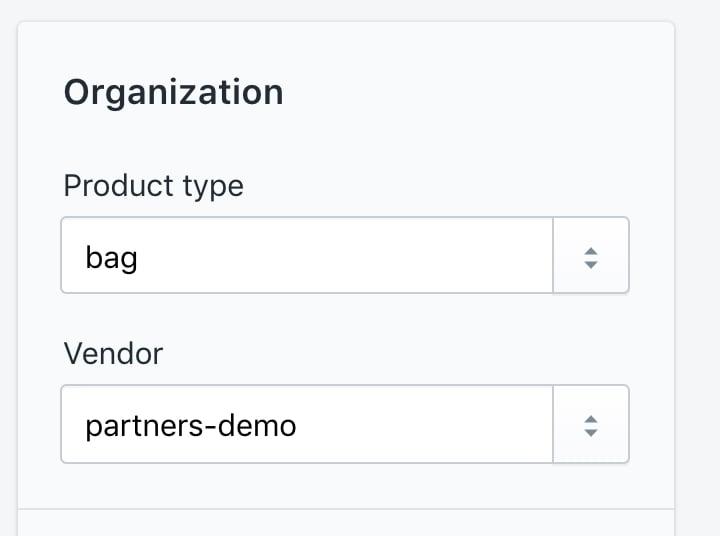
Keep it simple and aligned with how you actually think about your gear. For a clothing store, that’s straightforward: T-Shirts, Hoodies, Jackets, Dresses. Clear, consistent categories with nothing fancy. When this is done properly, segmentation becomes far more useful, especially in Performance Max, where your feed is doing the heavy lifting for targeting.
Once you’ve nailed the Product Type, that’s where Custom Labels come in.
Custom labels don’t change what your customers see, but they allow you to layer in the commercial data that actually matters. Think margin tiers, bestsellers, clearance stock, or seasonal products.
In simple terms:
-
Product Type = how products are grouped
-
Custom Labels = what gets prioritised
With that setup in place, you can actually start to control your spend. You can push budget into high-margin products, isolate your clearance stock, and scale what’s working without dragging the underperformers along for the ride.
This matters more than ever. With less manual control in campaigns like Performance Max, your product feed is doing the work. If it’s flat, Google takes the easy route. If it’s structured, you guide the performance.
Most eCommerce accounts don’t struggle because of bidding or creative; they struggle because the product data isn’t set up properly. Fix the structure, and everything else gets easier.
Once you’ve nailed the basics, there’s plenty more you can do to get sophisticated, such as:
-
Labelling products based on ROAS or conversion performance
-
Automatically tagging low-performing products for exclusion or reduced spend
-
Flagging high-stock or overstocked items to push more aggressively
-
Segmenting new arrivals versus proven products
-
Using price buckets or margin bands to control your bidding strategies
This is where things get really powerful – when your feed starts reflecting not just what your products are, but how your business actually runs. But none of that works if the foundation isn’t there.
Start with Product Type. Keep it clean. Then layer in your strategy. If your Shopify setup is messy and your campaigns are feeling the pinch, it’s probably not Google’s fault – it’s the feed.
Ready to get your product data working as hard as you do?
If your Shopify setup is feeling messy and your Google Ads performance is stalling, we’re here to help you get back on track. Whether it’s building a next-gen strategy or auditing your feed for quick wins, the Empire9 team is ready to get stuck in.
Get in touch with the team today to see how we can level up your eCommerce performance.