
We’ll cut to the chase – AI traffic is going to be increasingly important for your business, so as the way we search evolves, you want to be able to measure it, so you can adapt your online presence to better serve the new technology.
So, we present to you the 10 steps to set up a GA4 report for AI search sessions! (like this👇)
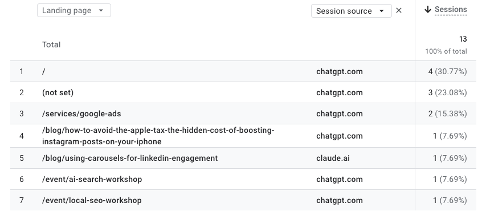
Creating the Custom Report
1. Go to “Reports” → Library in your GA4 property
2. Click “Create new report”
3. Choose “Detail report”
You’re nailing this we are a third of the way there! Let’s configure that report
dimensions next:
4. Add “Landing page” as your primary dimension, add “Session source” as a secondary dimension and add “Sessions” as your main metric.
Bosh. How about some optional filters? So you can filter by specific sources such as ChatGPT or Claude.AI (that’s what we do!)
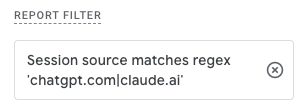
Image: For ChatGPT and Claude.ai we use a regex. Session Source matches regex – chatgpt.com|claude.ai
5. Keen on those filters? Add a filter for session source.
Woah oh, we’re halfway there, woah oh living on a prayer! Ahem. Moving on, let’s customise the visualisation!
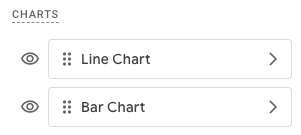
6. Set up both a line chart (for the time series view) and a bar chart (for the current breakdown)
7. Configure the time dimension to show your desired date range, and add any additional formatting or sorting that you need.
We’re on the home stretch, you’re about to have all the data of your AI search traffic in your hot little hands, let’s get these last three steps sussed:
8. Once you’ve configured the report, click “Save”.
9. Give it a descriptive name like “AI Session Report” – that’s what we called ours.
10. Go into the report library, and add it to any of the collections you like!
Congrats – you’re done.
Now, bask in the glory of your AI Search Traffic. You’ve got all the data you need to start informing your AEO strategy. Got no AI search traffic? Now’s the time to start thinking about how to optimise for AI. For that we can help, just get in touch.
In the Empire, we love a little data. Actually, we love a lotta data. So we are all about setting up a custom dashboard in Looker Studio with the GA4 data, and other data sources, and we can we can do this for you too!
A Looker Studio dashboard gives you a comprehensive look into your AI search traffic, and provides more context and nuance, ultimately bringing opportunities to light so you can keep a competitive edge in an evolving marketplace.